Inch Scale Design
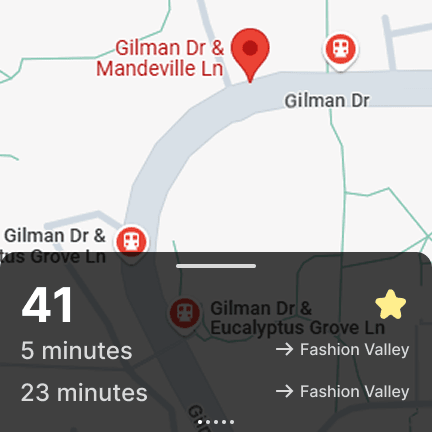
Initial Design
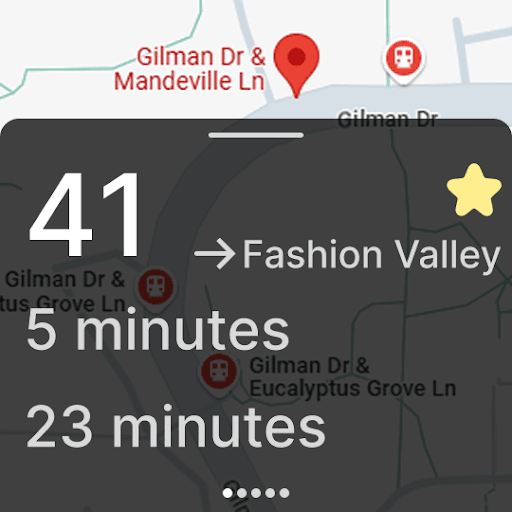
Design Iteration
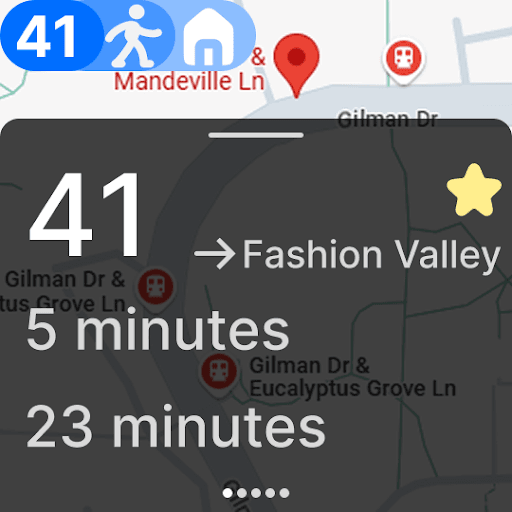
Final Design
Overview
The purpose of this project was to create a design that would fit on an inch scale display such as an Apple Watch. Essentially, the design needed to be simple but effective, allowing users to gain as much information as possible. For this project, I used Figma to create the designs of a display of a transit app that would be used by frequent public transport commuters to new users of public transport.
Design Process
Identifying Key Features
During this phase, I looked into existing transit apps and jotted down the key common features that were shared between the apps. I am also a frequent user of public transport, so I was able to use my own experiences to note down the key features that I would need in a transit app. Before starting to design the interface, I would create mock tasks, to help me better gauge what features would be most important to the user in order to complete the tasks.
Design and Feedback
For the initial design, I went with a very simple layout that would allow users to see the bus times but at the same time limit the features as I did not want to overwhelm the user with information and clutter the interface as it is an inch scale design. For each bus stop, they would click on the bus stop to see the bus times for that stop. After the initial design, I would ask for feedback from others and a common theme that I would get was the map was too dominant and the bus times overlay was too small. This would then lead me to create the second design, which would be more focused on the bus times and less on the map. After a second round of feedback, I would learn that for an inch scale design, you would want to utilize the space as much as possible, so I would then create the last design. For my last design, I added a feature on the top of the screen that would essentially give users directions back home, which is a feature that I found very useful when I was using public transport. Users using this interface would be able to click on any bus stop on the map and see the bus times for that stop, as well as the directions back home.
Challenge
A challenge I had, creating this interface, was finding a way of using as much real estate as possible without cluttering the screen and overwhelming the user with information.
Solution
The solution that I found helpful was to make key elements bigger and add as little text as possible.
Future Directions
In the future, I would like to implement this design into a real app that people could use. Before doing this, I would like to do more user testing on the "directions back home" feature to see if it is actually intuitive to the user.